Engineering July 9, 2026 · 7 min read
Model Orchestration: How to Architect a Production AI System
TL;DR
The interesting decision in a production AI system is not which model you use, it is which model does which job. That is model orchestration, and getting the allocation right is craftsmanship. Using Boston, my AI BDR, as the case study, I walk through how the work is divided across models, why each one earns its place, what it costs per lead, and where a human stays in the loop. The pattern is not specific to sales. It is how to build most AI workflows.
The interesting decision in a production AI system is not which model you use. It is which model does which job.
That is model orchestration, and it is where the engineering actually lives. Choosing the right model is only one decision. The rest is deciding how information moves, where it is stored, how work is coordinated, and how failures are observed. Getting that allocation right is craftsmanship.
I will use Boston, the AI BDR running behind my contact form, as the case study. Last week I covered the role: what a great BDR does, and why I wrote a specification before I wrote a line of code. This week is the machine, and the point is portable. If this works for a sales workflow, the same shape works for support triage, document processing, or any place you were about to reach for one giant model to do everything.
The lead in the screenshots is Pindrop, and that is not a coincidence. Pindrop was one of the five job listings I broke down in Job Postings Are Market Research, where I argued that a tight cluster of hiring posts is cleaner market signal than most surveys. I applied to that role, to own their marketing site end to end. I did not get the offer. So the job description found a second life: I dropped it into my own contact form and ran it through Boston. That is the demo below. The lead in the screenshots is my own test submission, not a real inquiry from Pindrop.
Model allocation is craftsmanship
Each stage of the pipeline runs on a different model, chosen for the work it does. That allocation is the decision that carries the system.
Every professional matches the tool to the task. A doctor orders an X-ray, not an MRI, when the X-ray answers the question. An impact driver strips the threads on a fine fastener; a hand screwdriver is too slow for a deck of a hundred screws. Choosing which model does what is the same judgment. Reaching for the largest model on every task is not sophistication, it is inexperience. A well-run system puts the right tool in each hand.
Boston runs two models. A search model researches the lead. An efficient open model writes the draft. Orchestrating those two, deciding what each one owns and where the handoff happens, is the whole design.
The shape of the system
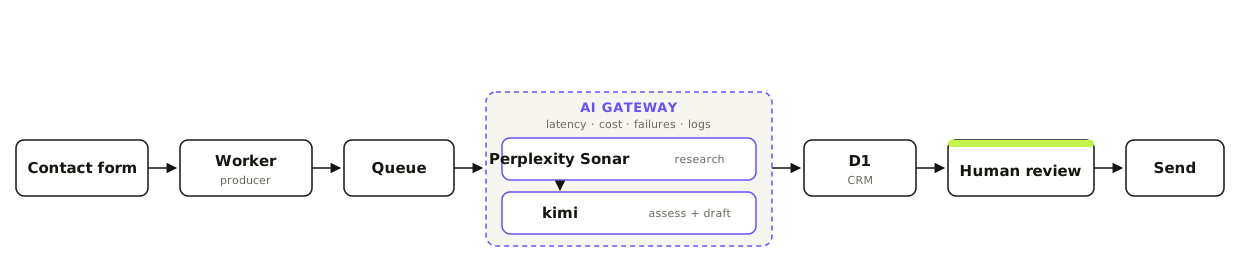
A lead flows left to right. The models sit inside the AI Gateway; the last box before send is a person.
A form submission hits a Cloudflare Worker, which drops the lead onto a queue. The queue matters: it buys the models time to reason past the request timeout, so the visitor gets an instant confirmation while the real work happens behind it. A consumer picks the job up, runs the two model calls through the AI Gateway, writes everything to the database, and files a draft for me to review. Nothing leaves that last box without a person.
Retrieval is a solved problem
Search is its own discipline: a crawler, ranking, page extraction, chunking, a citation layer, and the prompt assembly that stitches it together. Maintaining that well is a full-time product, and Perplexity leads in this category.
Research goes to Perplexity Sonar. It searches the web and returns a cited, synthesized answer in one call. The alternative is to do all of that yourself with a general model: call a search API, fetch the raw pages, stuff them into the prompt, and pay for every one of those tokens. That is renting the whole library to answer one question. Perplexity does the retrieval internally, so I pay a small search fee plus a modest completion.
Cost, per lead:
- Research: two Sonar calls, one for the company and one for the person, about three to four cents combined.
- Assessment and draft: one open-model call, a fraction of a cent (more on that next).
- All in: roughly a nickel a lead.
What we ask the search model to research
We do not ask for everything. We ask for exactly what a BDR needs to open a smart conversation, and specifically who owns marketing.
The instruction, in plain terms: research the company to prepare a marketing-engineering consultant for an inbound lead; prioritize what the business does, who likely owns marketing, and the context that would improve the first conversation; return only facts supported by web search, and never guess. For key people, prioritize the marketing decision-maker (CMO, VP of Marketing, Head of Marketing), falling back to a founder or CEO only when no marketing leader is found.
Back comes a cited profile: company name, a one-line description, a one-paragraph overview, industry, HQ location, a size band, key people, social links, and the sources behind it all. Grounding the draft in cited and verifiable facts.
Once the facts exist, drafting is not hard
Here is why the draft does not need a frontier model. Once the facts exist, writing a professional response inside a fixed framework is not especially difficult. The hard part, knowing true things about the company, is already done. What is left is to greet a lead by name, follow four steps, and stay concise. That is bounded work.
Assessment and the draft go to kimi, an open-weights model on Cloudflare Workers AI. It is efficient, in-platform with no external API hop, and more than capable for this. Fluency is table stakes; I do not spend frontier-model money to say hello and follow a framework. I tune it with a low temperature and grounded prompts, and I keep a vetted stronger open model (Llama 3.3) in reserve for when the work demands it.
Observability: an AI system is just an API
Every model request runs through a Cloudflare AI Gateway. That gives me latency, cost, failures, prompts, and model usage in one place, per model, per request.
AI systems deserve the same observability as any API, and now they have it. When a draft looks off, I can see the exact prompt and response that produced it. When I want to know the real cost per lead, it is a dashboard, not a guess. The gateway also gives me a spend cap and a caching layer, the same operational controls I would put in front of any external dependency.
The confidence score
Grounded research is only useful if you know how much to trust it, so every profile carries a confidence score. It is deterministic, not a vibe. I count verified signals: a company name, an industry, at least one real marketing leader, a LinkedIn URL, an HQ location, and two or more sources. Five or more signals is high confidence, three or four is medium, less is low.
That number then changes behavior. When confidence is low, the draft hedges its conclusions and leans on qualifying questions instead of asserting things the research could not verify. A score I can explain is a score I can build rules on.
The workflow, stage by stage
Stage one: a lead arrives. The contact form posts to the Worker, which queues the lead. Instant confirmation to the visitor; the reasoning happens behind it.
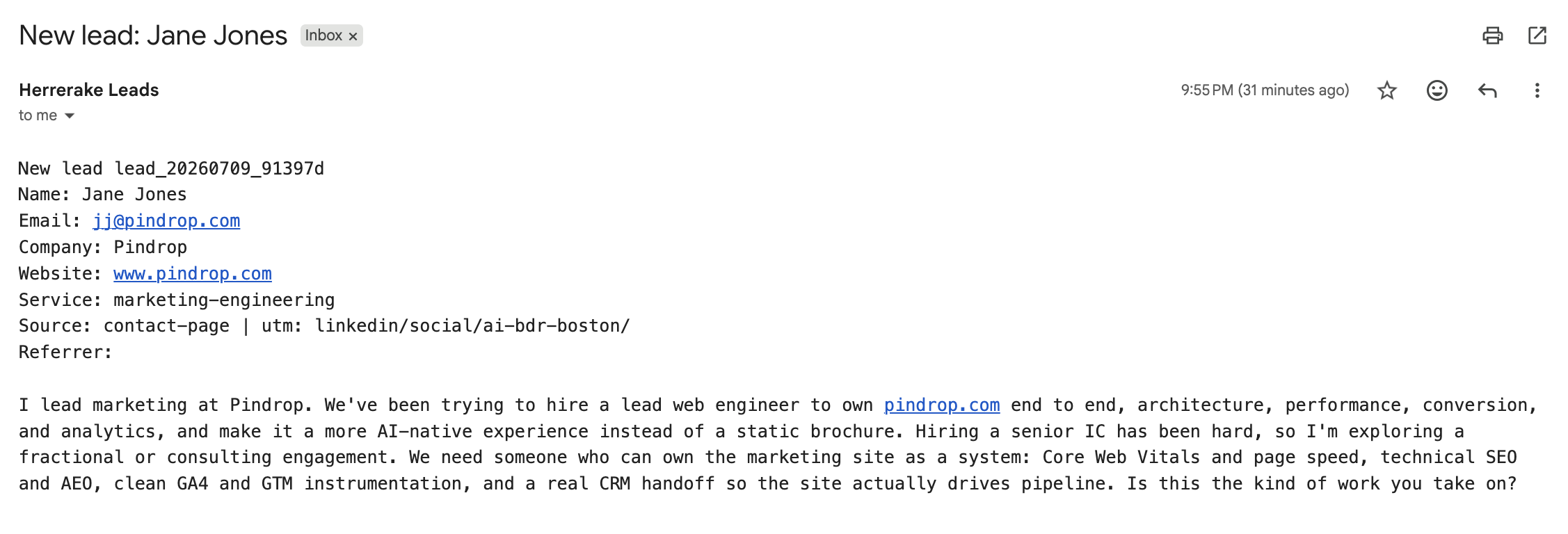
The moment a lead hits the form, before Boston touches it.
Stage two: Boston researches and drafts. Perplexity grounds the assessment in real company facts; kimi judges fit and legitimacy; and the draft follows the Fanatical Prospecting framework (open with insight, relate, bridge, ask), stays concise, and ends with a specific ask. It is written in my own first-person voice.
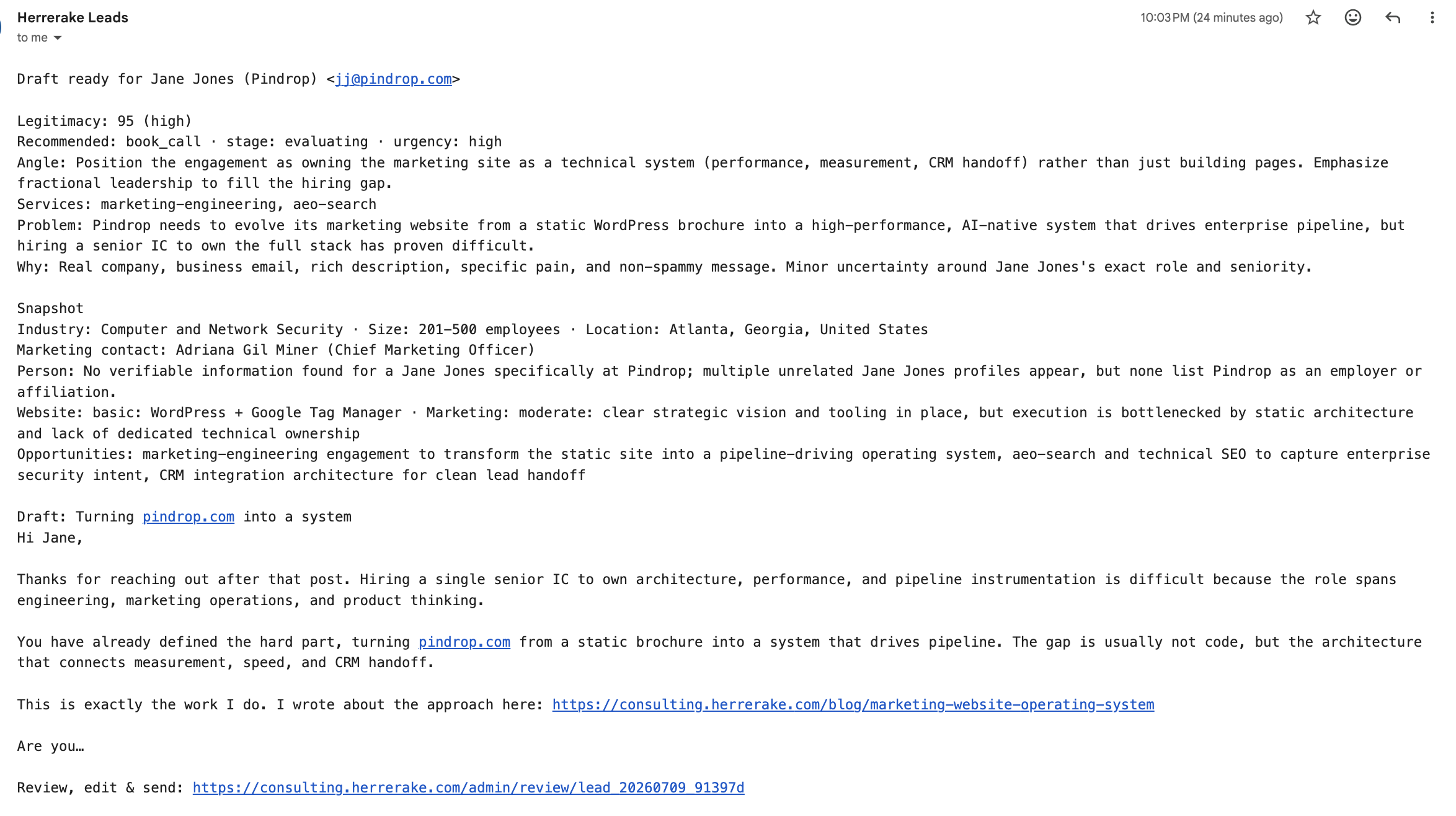
Research and a ready-to-send draft, in my inbox, minutes later.
Stage three: I review in the CRM. The review dashboard holds every lead’s research, the assessment, the editable draft, a send button, and an activity timeline, all backed by D1 and gated behind Cloudflare Access.
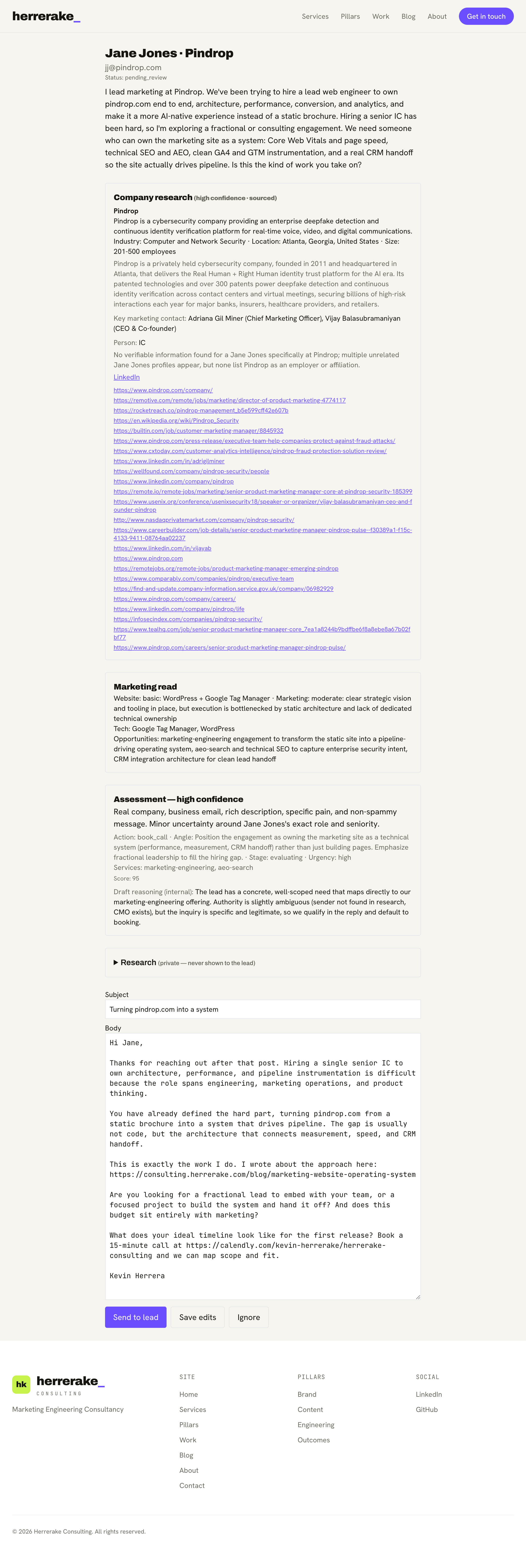
Nothing sends without me. This is the CRM we built.
If it works for Boston, it works for your workflow
Strip the sales specifics and what is left is a pattern. Orchestrate models, matching each to its job. Rent the solved problems instead of rebuilding them. Ground generation in real, cited facts. Put every model call behind a gateway so you can see cost, latency, and failures. Keep a human on the final decision.
None of that is specific to a BDR. Swap the lead for a support ticket, a contract, or an incident report, and the same architecture holds: a specialist model to gather truth, an efficient model to act on it, a store, and a person at the gate. That is the same engineering discipline I would bring to a client’s marketing system, and it is the useful part to take with you.
See what Boston drafts for you
The best way to understand a system is to run it. Fill out the contact form with a real question about your marketing site or systems, and Boston will research your company, assess the fit, and draft a reply, the exact pipeline described here. The response you get back is the one Boston wrote, after I have read it and approved it. Think of it as a live demo where you are the lead.
References and further reading
- Putting an AI BDR Into Production: Meet Boston, the role, the spec, and the human-in-the-loop philosophy this post builds on.
- Infrastructure and Systems, how AI-enabled workflows create leverage in a marketing system.
Key takeaways
- A production AI system is orchestration, not one model. Match each model to the job it does best. Model allocation is craftsmanship.
- Rent solved problems. Retrieval (crawl, rank, extract, cite) is solved; use a specialist like Perplexity instead of rebuilding it.
- Once the facts exist, drafting inside a fixed framework is not hard. Do not spend frontier-model money where an efficient open model suffices.
- Route every model call through a gateway. AI systems deserve the same observability as APIs: latency, cost, failures, prompts, and usage in one place.
- Keep a human as the final gate. The system prepares; a person decides.
FAQ
What is model orchestration?
Model orchestration is dividing a task across multiple AI models, each chosen for the job it does best, instead of routing everything through one large model. In this AI sales workflow, a search model (Perplexity) does retrieval and an efficient open model (kimi) does the drafting. The orchestration, which model runs where and why, is the actual engineering.
Why not just use one big frontier model for everything?
Because the tasks are different. Research is retrieval: find current, cited facts on the open web. Drafting is bounded generation: greet a lead by name and follow a framework using facts you already have. A purpose-built search model does the first far more cheaply than stuffing raw pages into a general model, and an efficient open model is more than enough for the second. Reaching for the largest model on every step is cost without benefit.
What does the AI lead qualification cost per lead?
A few cents. Research is two Perplexity Sonar calls (company and person) at roughly three to four cents combined; the assessment and draft run on Cloudflare Workers AI for a fraction of a cent. Everything routes through a Cloudflare AI Gateway, which reports the exact per-model cost.
Is this an AI BDR or an AI sales agent?
Both terms fit. Boston is an AI BDR (business development rep) that handles the top of the sales workflow: research every inbound lead, run AI lead qualification, and draft a first reply. It is an AI sales agent with a deliberately narrow scope and a human approving every send.
Does the AI CRM send email on its own? Where is the human in the loop?
It does not send on its own. Boston researches, assesses, and drafts, then files everything in a custom AI CRM for review. Nothing reaches a lead until I read it, edit if needed, and hit send. Human-in-the-loop AI is a design decision here, not a missing feature.
What is the stack?
The Perplexity API (Sonar) for search-grounded research, Cloudflare Workers AI (the kimi open model) for assessment and drafting, a Cloudflare AI Gateway in front of every model call for observability and a spend cap, Cloudflare Queues for async processing, and D1 as the database behind the CRM. All of it is the same AI sales workflow described in this post.
Want this applied to your marketing website?
Book a call →Get the weekly newsletter
One signed take on brand, content, systems, and outcomes.