Content July 20, 2026 · 8 min read
Own the List, Rent the Send: A Newsletter Delivery Workflow
TL;DR
Last week I shipped Austin, the agent that researches and drafts the first pass of my weekly newsletter. This week I built the workflow that turns its shortlist into a finished issue. Every Sunday Austin completes its sweep. On Monday I choose the three or four stories worth sending, rewrite every take, and write the introduction and subject line by hand. Once I approve the issue, Resend delivers it to the confirmed list while my own database remains the system of record for subscribers, consent, issues, and send history. I own the list and the archive. I rent the send.
Own the List, Rent the Send: A Newsletter Delivery Workflow
Last week I shipped Austin, the agent that handles the first pass of my weekly newsletter. Every Sunday it scans the week across AI, engineering, marketing, and product, scores each story through the lens of my four pillars, drafts an initial take, and gives me a shortlist of the strongest candidates. Then it stops. It does not choose the final stories, it does not write the introduction, and it does not publish or send anything. A shortlist is not a newsletter.
This week I built the other half of the system: the delivery workflow that turns Austin’s research into a finished issue and eventually into an email in a subscriber’s inbox. The goal was not simply to add a send button. It was to create a weekly ritual that takes minutes, keeps every important decision visible, and makes it difficult to skip a step. Here is how that ritual runs, from Sunday evening to Monday send.
Sunday: Austin finishes the sweep
Austin runs automatically on Sunday evening. When the sweep finishes, I receive an email with the number of candidates it found and a direct link to the review dashboard. That notification is the handoff between the machine’s work and mine.
If the sweep produces fewer strong candidates than expected, the notification tells me it was a thin week, so I know before opening the dashboard that I may need to find an evergreen story, broaden the search, or decide the issue is not strong enough to send. If the sweep fails, I receive a separate failure notification instead. Both outcomes are explicit, which means I never have to check a log, remember whether the cron ran, or wonder whether the absence of an email is a quiet failure. The system speaks when a decision is required and stays out of the way the rest of the time.
Monday: choose what earns attention
On Monday I open the review dashboard.
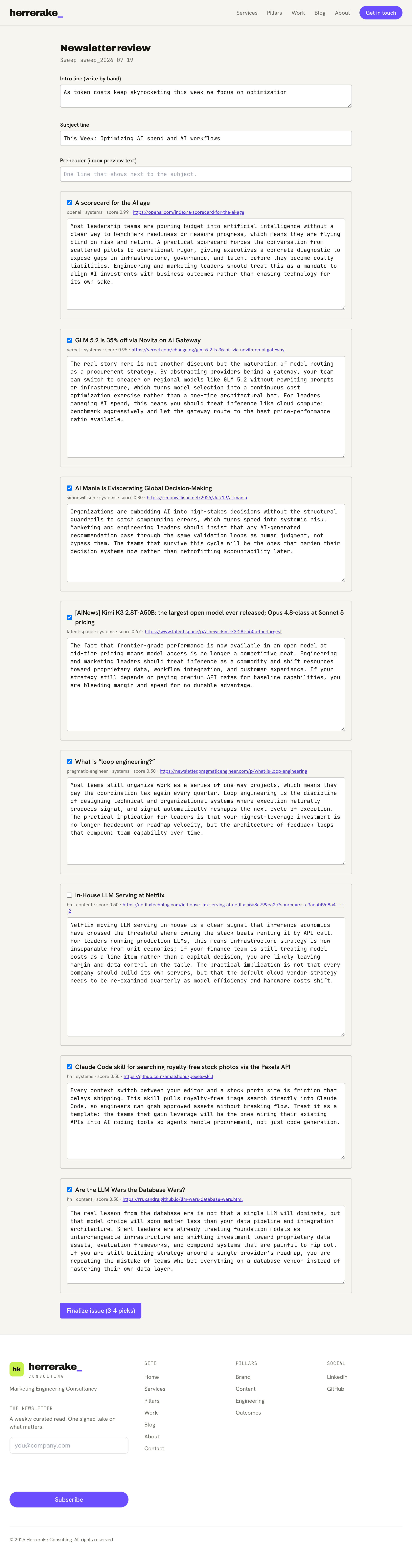
Every candidate Austin found appears as a card with the source, pillar, score, and drafted take. My first job is subtraction: I read through the shortlist and keep the three or four stories that actually deserve a subscriber’s attention that week.
The score helps order the reading, but it does not make the decision. A highly scored article can still repeat something my audience already knows, and a lower-scored story can earn its place because it connects several ideas or gives me something useful to say. Austin is good at reducing the surface area of the decision, evaluating relevance, freshness, authority, and alignment with the newsletter, but it cannot decide what I am willing to attach my name to. That part stays with me.
Rewrite every take
After selecting the final stories, I edit Austin’s draft for each one. The draft identifies the central argument, connects the story to one of my pillars, and suggests why the reader should care, but it is scaffolding, not finished copy. I rewrite every take into my own voice before it reaches the issue. Sometimes that means tightening the language, and sometimes it means replacing the argument entirely because I see a different implication than the agent did.
The value is not that Austin writes for me. It is that I am no longer staring at an empty page after spending hours searching the internet. I begin with a researched shortlist and a reasonable first attempt, so my energy goes into judgment and interpretation instead of collection.
Write the message by hand
Three fields at the top of the dashboard stay blank until I write them: the introduction, the subject line, and the preheader. Those are intentionally human. The individual stories may come from different publications and cover different corners of the industry, and the introduction is what gives the issue a spine. It explains why these stories belong together and what the reader should pay attention to, and I cannot write that framing until the final selection is made.
For one issue, the strongest stories clustered around the rising cost of AI systems and the teams building more efficient workflows, and that became the theme of the introduction and subject line. The articles did not arrive with that connection already attached; it emerged from reviewing them together. That framing is a large part of what the reader subscribes for. They can find individual links on their own, so my job is to decide which ones matter, explain how they connect, and offer a useful point of view. Once the introduction, subject, preheader, and takes are ready, I finalize the issue.
Finalizing is not sending
Finalizing freezes the editorial version of the issue. It creates a permanent slug, saves the selected stories and edited takes, and renders the exact version that will be published. What it does not do is send the email. Instead it moves me to a separate preview and send screen.
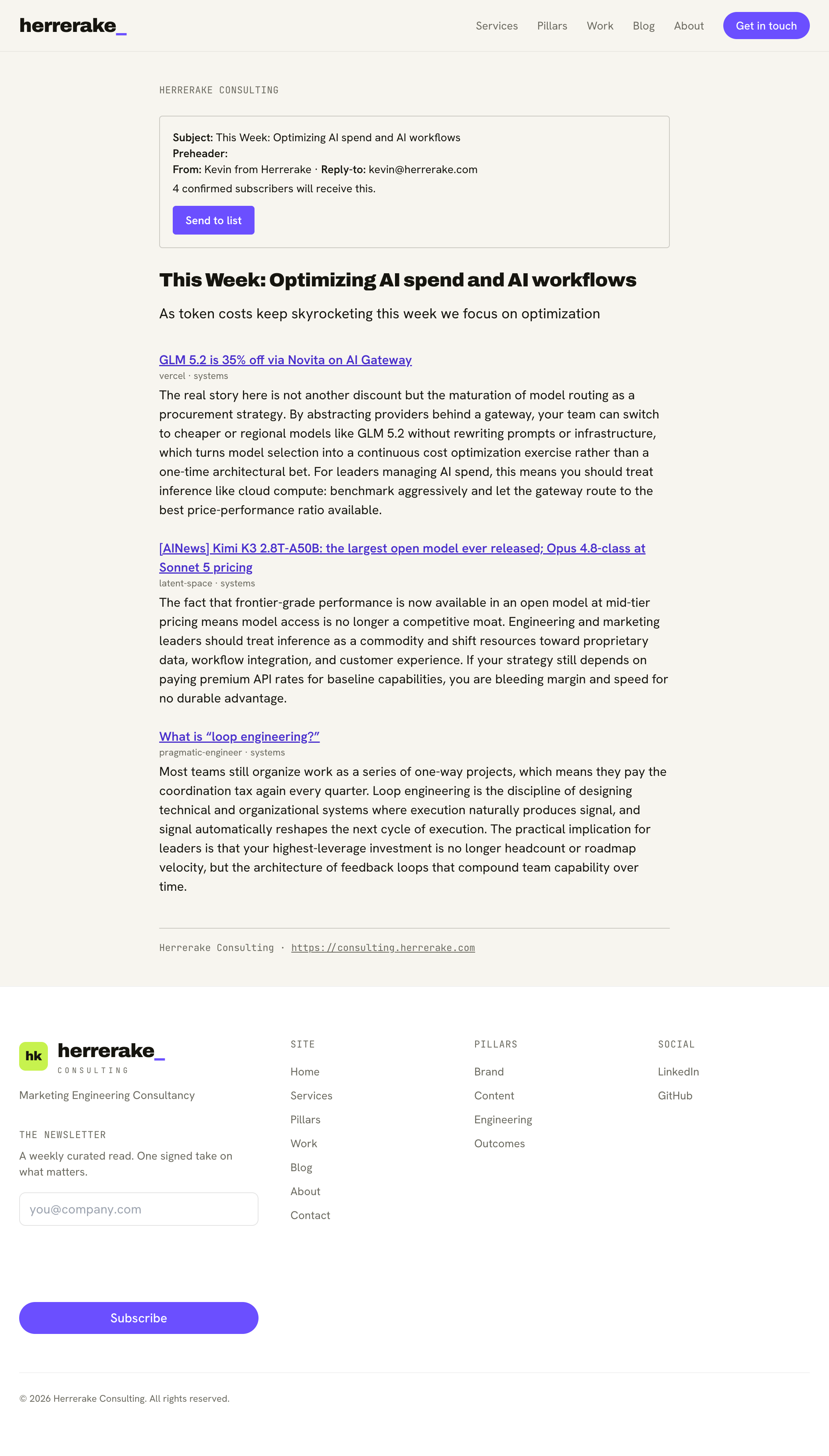
This is the final human gate. The preview shows the subject, preheader, sender identity, reply-to address, body content, and the number of confirmed subscribers who will receive the issue, so I can read the newsletter exactly as a subscriber will see it before anything leaves the system. Only then does the send button become relevant. Two deliberate actions stand between Austin’s shortlist and a subscriber’s inbox: first I finalize the editorial product, then I release that product to the list. Both actions are mine.
The plumbing behind the send button
The send button looks simple because the complexity belongs underneath it. When a send begins, the system fixes the recipient cohort. Only subscribers who have completed double opt-in and are active at that moment are included, so someone who confirms their subscription halfway through the send is not added to an issue already in progress. They begin receiving the newsletter with the next issue.
The recipients are divided into batches and sent through Resend. Each batch receives an idempotency key derived from the issue and batch number, so if a request is retried, Resend can recognize that it belongs to an existing operation instead of delivering the same batch twice. Every accepted message is also written to a send ledger in my database, which gives the system a durable record of which issue was sent, who it went to, when the provider accepted it, and which provider message ID came back. If a later batch fails, the workflow can resume with the remaining recipients rather than restarting the entire send.
Every message also includes unsubscribe headers and a direct unsubscribe link. In supporting email clients, subscribers can leave with the built-in one-click unsubscribe control, without replying, signing in, or searching through the website. None of this makes the newsletter more interesting to read. It makes the newsletter more trustworthy to receive.
The issue becomes part of the archive
Once the send finishes, the issue is sealed. The same URL that served as the preview becomes a read-only entry in the public newsletter archive, recording when the issue was sent and how many subscribers were included.
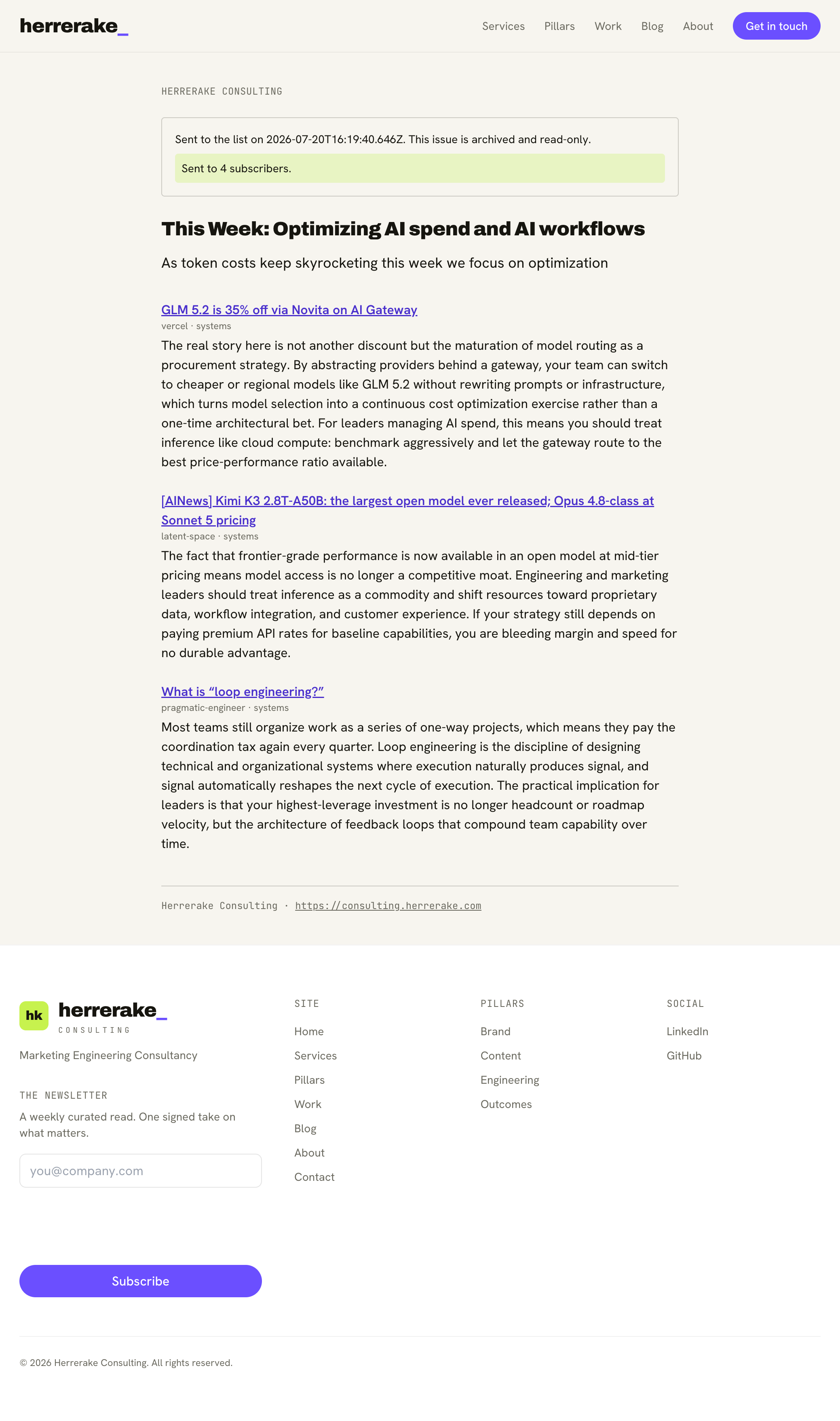
The email is no longer an isolated campaign living inside a provider’s dashboard; it becomes part of the permanent editorial history of the site. That matters because the archive has value well beyond the original send. Each issue becomes another piece of public content that can be linked, shared, discovered, and referenced in future writing, and it shows how my thinking develops over time. The newsletter is an email product, but it is also part of the website’s authority engine.
Everything behind one locked door
The review dashboard and send controls live under /admin, and that entire surface sits behind Cloudflare Access with a single-user Google login. The newsletter dashboard and
the operator tooling behind Boston, the AI BDR, never render until Access verifies my identity. Access is the front door.
The finalize and send endpoints also reject cross-origin requests, which prevents another website from triggering those state-changing actions through an authenticated browser session. The two controls solve different problems: Cloudflare Access decides who can enter the dashboard, and the origin check narrows where sensitive requests can come from once someone is inside. This is the only part of the system capable of sending email to the entire list, so it deserves more protection than a hidden URL and an optimistic assumption that nobody will find it.
Own the list, rent the send
Last week I described the principle behind Austin’s research layer: rent the commodity and own the asset. I applied the same principle here. Resend is good at moving email, and it manages the delivery infrastructure, provider relationships, and operational complexity I have no reason to rebuild myself, so I rent that capability.
But Resend is not the system of record for the newsletter. Every subscriber lives in my own D1 database, along with their status, double-opt-in record, unsubscribe state, editorial history, finalized issues, recipient cohorts, and send ledger. Resend receives only the information required to deliver each message; the durable business data stays inside the system I control. If I ever switch sending providers, the subscriber list does not need to be exported from a product that owned the workflow, the archive does not have to move, and the editorial dashboard does not need to be rebuilt. I replace the delivery adapter and nothing else. The list and the archive are the asset. The email provider is infrastructure.
The workflow is the product
Austin removed the weekly search, and the delivery layer removed the mechanics of preparing recipients, batching messages, recording sends, and publishing the archive. What remains is a Monday workflow that takes minutes: review the shortlist, choose the stories, rewrite the takes, find the theme, write the introduction, preview the issue, and send it. The machine handles the repetitive work before and after the editorial decision, and the judgment in the middle stays human.
That is the same pattern behind Boston and Austin, and it is becoming the pattern behind the systems I build for clients. Start by identifying the judgment that creates the value, then automate the tedious work surrounding it. The person’s taste, accountability, and experience are the reason the product deserves attention in the first place, and that is exactly the part worth keeping in human hands.
Key takeaways
- A newsletter is not just a collection of features. It is a weekly operating workflow that should make publishing easier without removing editorial responsibility.
- The agent produces a shortlist, not a finished publication. The final selection, point of view, framing, and decision to send remain human.
- Resend handles delivery, while my own D1 database remains the system of record for subscribers, consent, issues, and send history.
- A trustworthy send workflow requires double opt-in, unsubscribe support, a fixed recipient cohort, idempotent batches, and a record of every accepted message.
FAQ
Does the newsletter send itself once the agent finishes?
No. Austin stops after producing the shortlist and first drafts. I select the final stories, rewrite every take, and write the introduction, subject line, and preheader by hand. Finalizing and sending are two separate actions, and nothing is delivered without my approval.
Why use Resend instead of a newsletter platform like Substack or Beehiiv?
I want my own database to remain the system of record for subscribers, consent, issues, and editorial history. Resend specializes in delivering email, so I use it for that commodity instead of building mail infrastructure myself. This gives me control of the asset without taking responsibility for operating mail servers.
How is the send dashboard secured?
The entire /admin surface sits behind Cloudflare Access and a single-user Google login. The finalize and send endpoints also reject cross-origin requests, adding another boundary around the state-changing actions inside the dashboard.
What keeps subscribers from receiving duplicate emails?
The system fixes the recipient cohort when a send begins, assigns each batch an idempotency key derived from the issue and batch, and records accepted messages in a send ledger. If a batch needs to be retried, the system can continue from the remaining recipients instead of starting the send over.
Want this applied to your marketing website?
Book a call →Get the weekly newsletter
One signed take on brand, content, systems, and outcomes.